

Series: Clustering Sterling B2B Integrator – Part 1: Why Cluster · Part 2: Architecture · Part 3: Load Balancing · Part 4: Control & Recovery · Part 5: Adapters & Edge · Part 6: Capacity & Failover
A cluster buys you three properties, and people mix them up constantly. Get the definitions straight first, because each one gets a different design.
What a “cluster” means here
A clustered B2B Integrator installation is several application installations pointing at one database. That one shared database is the whole definition. The nodes share very little else. Each node behaves like a standalone installation that can also talk to its peers, swap load information, hand off work, and coordinate operations.
A federated system is a different thing. Every installation in a federation has its own database, and the installations talk to each other over URLs. Federated members can sit anywhere in the world. Cluster nodes usually sit in one location. You can combine the two: an entire application cluster can be a single member of a federation.
| Cluster | Federation | |
|---|---|---|
| Database | One, shared by all nodes | One per installation |
| Inter-node comms | JNDI/RMI, multicast or JGroups, DB-mediated tokens | URLs between installations |
| Typical geography | Same data center / subnet | Anywhere |
| Work sharing | Automatic BP distribution between nodes | Explicit, via integration calls |
Reliability: correct operation
Reliability is measured as Mean Time Between Failures (MTBF), and you improve it with redundancy. When a mission-critical B2B flow breaks, payments don’t go out, orders don’t arrive, and shipments stop. The B2B engine is only as reliable as what it sits on, so you need all of these:
- Redundant network connections. More than one link from each server, and more than one link leaving the building on physically separate routes to the carrier’s point of presence.
- Redundant network paths. Duplicate every upstream component: DNS, firewalls, HTTP servers, anything the application server talks to.
- Reliable server hardware. ECC/SECDED memory and hot-swappable parts. These catch silent internal corruption that nothing higher in the stack can see.
- Mirrored or RAID storage, temp space included, with cross-connected controllers.
- A high-availability database, clustered or failover-capable. A JDBC driver that already supports transparent failover generally works, with light customization. If you fail over by IP takeover, B2B Integrator rolls back any transactions in flight while the database is gone.
- HA auxiliary systems. If your ERP or middleware falls over, the business is down even though the integrator is perfectly healthy.
- Reliable power, redundant from the substation through the panels, with UPS and generators behind it. A cut cable takes hours to repair.
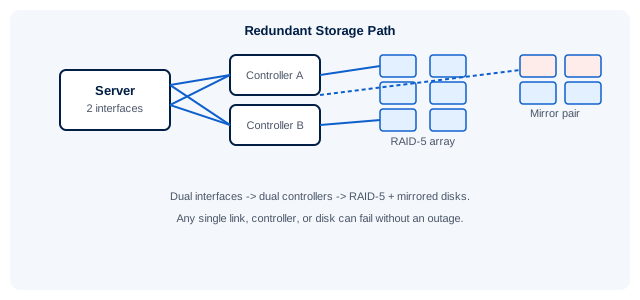
Fig 1.1 – Redundant storage path. Dual interfaces cross-connected to dual controllers. RAID-5 rebuilds a failed disk from parity, and mirroring writes every byte twice. Corruption can still get through, so you still need good backups.
Two items don’t fit on a hardware checklist, and they matter most. Monitoring: the network, servers, and database need their own monitoring stack (vendor tools, Nagios, Big Brother, and so on). B2B Integrator can feed that stack through the OPS command line and its HTTP, FTP, file-system, and database adapters. Its own alerts and on-fault processing cover failures at the business-process level. Documentation and automation: written runbooks and scripted procedures do more for reliability than any extra hardware.
Availability: being usable
Reliability is about the system working correctly. Availability is about people being able to use it. High availability (HA) means cutting both unscheduled and scheduled downtime. HA is expensive, so answer these questions before you design anything:
- What does an hour of downtime really cost?
- Does the length of each incident matter, or only the total?
- Are there acceptable maintenance windows?
- Must you run at full capacity during a failure, or is degraded service acceptable?
Most outages are not hardware failures. They come from operations: slow database recovery, untested server rebuilds, and planned changes that weren’t coordinated with the other systems sharing your infrastructure. Make the environment reliable first, then make it highly available.
Scalability: handling volume change
Clustering the database, the file system, the web tier, and the integrator itself gives you real headroom, and a small cluster is often a better buy than one bigger box. There is a catch. Two nodes run roughly twice as many business processes at once, so the database takes twice the load. Every node you add increases the load on everything shared.
Four factors cap the throughput of a cluster:
- How finely the work is divided
- Where the adapters are placed
- Database engine performance
- Contention between processes (locks, synchronization)
Anti-pattern: A business process in which every instance updates the same database row will never scale. The row lock forces instances to run one at a time, however many nodes you add. Fix the design: process more or less data per BP, do more or less work per step, divide work between BPs differently, and remove cross-process locking.
Picking a strategy
| Priority | Options to evaluate |
|---|---|
| HA / failover | Hot standby / backup system vs clustering. Either way, remove every single point of failure. |
| Load & performance | Scale vertically (more CPU/RAM on one box) vs horizontally (more nodes). Factor in growth and required service levels. |
As a failover mechanism, an application cluster has clear advantages over OS-level HA. Every node does useful work all the time and absorbs peak load. There are fewer moving parts. It is portable across platforms. It is a single-vendor solution. You can also run it on top of OS-level failover to get even more availability.
Takeaways
- Cluster = many nodes, one database. Federation = many databases.
- Get reliability right before you work on availability.
- Every node you add puts more load on the database. Size it for that.
- Shared-row designs won’t scale on any number of nodes.
Need a hand assessing whether your own environment is ready to cluster, or want someone to review the design before you build it? That’s exactly what our EDI & MFT Tuning & Performance work covers.
Next: Part 2: Anatomy of a node – controllers, JNDI, and the nine queues →