

Series: Clustering Sterling B2B Integrator – Part 1: Why Cluster · Part 2: Architecture · Part 3: Load Balancing · Part 4: Control & Recovery · Part 5: Adapters & Edge · Part 6: Capacity & Failover
Automatic distribution is the default. This part covers how to override it, and what the cluster does when a node disappears halfway through a business process.
The Central Operations Controller and its token
Every node runs a COC in a separate JVM. At startup it brings up the local node’s components (Service Controller, Scheduler, and the rest) in order. Two mechanisms make it fault-tolerant.
Heartbeat. A heartbeat thread inside the COC JVM polls the cluster nodes, finds new members, and updates a local cache of node status. Once a node is fully up, every COC holds a connection to every node and can answer requests.
Token. Exactly one COC holds the token that makes it master. The database mediates who owns the token and how it passes. When the token holder sees a node fail, it:
- Releases the locks the failed node held.
- Fails over scheduler jobs: it picks a live node to take over the dead node’s scheduled jobs.
If the token holder is the node that died, a COC on a surviving node takes the token. Only one node ever holds it.
Token failover timeline:
- Heartbeat misses Node 3 – the token-holding COC on Node 1 notices Node 3 stopped responding.
- Release Node 3’s locks – locks held by the dead node are cleared in the shared database.
- Move Node 3’s scheduler jobs – the COC picks a live node to run them.
- (later) Node 1 itself dies – the COC on Node 2 claims the token through the database. The database allows only one owner.
Mandatory and preferred nodes
You can pin a single step or a whole BP to a node. Do this when a step needs a non-clusterable adapter, or needs a document that only exists on one node’s local disk.
| Mode | Step level | BP level |
|---|---|---|
| Mandatory | Step fails if the node is down | All steps run on that node. BP fails if it is down. |
| Preferred | Runs there if it is up, otherwise on the current node | Tries that node, otherwise any active node |
Set BP-level pinning on the Process Level page of the check-in wizard.
Execution roles: pin to a pool of nodes
An execution role names a group of nodes. A BP bound to a role runs only on those nodes, and the target is chosen by load factor and node health. For example, assign role POProcess to nodes 1, 5, and 9, and all purchase-order BPs spread across those three nodes.
- A BP uses a mandatory node or a role, never both.
- A role with one node behaves like a mandatory node.
- Roles are assigned from the command line only. There is no UI for it.
Assign a role – UNIX/Linux
bin/opscmd.sh -cUPDATESERVER -nnode1 -pID=node1roleAssign a role – Windows
bin\opscmd.cmd -cUPDATESERVER -n<node_name> -pID=<node_role>Careful: You can run this any time the system is up. But renaming a node’s role breaks every BP still bound to the old role. Treat role names like API contracts.
When a node dies mid-process
A failed node is handled like a single-node outage. The system persists the state of every BP in flight, so any active transaction on the dead node stops but nothing is forgotten. By default, recovery:
- marks that node’s BPs Interrupted,
- rolls each one back to its last edge, the last step that completed,
- waits for an operator to resume or restart it, on any node. You can do this in bulk.
You can change this default, but you shouldn’t. Here is why: if a node crashed during an HTTP POST and never saw the ACK, the system cannot know whether the partner received the data. Steps that touch the outside world need a human to decide. With full persistence, steps that stay inside the system can usually resume exactly where they stopped.
Document storage across nodes
Document storage defaults to the database in a cluster, because every node can read it. If you choose file-system storage, every node needs the same path, which means NFS or a clustered file system. You can store documents on one node’s local disk and pin consumers with mandatory nodes, but if that node dies, its BPs fail until it comes back or you reconfigure them.
The NFS cross-mount trick
NFS is slow, so use it only when a BP actually moves to another node. Point document_dir in jdbc.properties at a local disk on each node, then cross-mount each node’s local directory on its peers at the same path. Writes always go to local disk. Reads use the full path stored in the database, which goes through NFS only when the reader is on a different node.
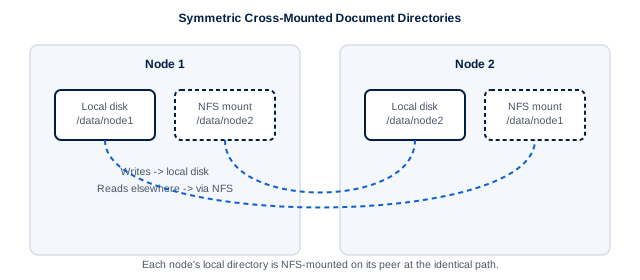
Fig 4.1 – Symmetric cross-mounted document directories. Node1 writes /data/node1/file1 to local disk and the full path goes into the database. Node2 reads the same path through its NFS mount. This works as long as every node can see every /data/nodeN.
jdbc.properties – per node
# node1
document_dir=/data/node1
# node2
document_dir=/data/node2
# and on each node, NFS-mount the peers' dirs at identical paths
Takeaways
- One DB-mediated token, so one master COC. It cleans up locks and moves scheduler jobs when a node dies.
- Mandatory means fail-closed. Preferred means fail-open. Roles pin to a pool chosen by load and health.
- Assign roles with
opscmd UPDATESERVER, and never rename a role casually. - Recovery rolls back to the last edge. A person decides about anything that touched an external system.
- Write to local disk, read across NFS at identical paths.
← Part 3: Load Balancing | Next: Part 5: Adapters that won’t cluster, service groups, and the perimeter →