

Series: Clustering Sterling B2B Integrator – Part 1: Why Cluster · Part 2: Architecture · Part 3: Load Balancing · Part 4: Control & Recovery · Part 5: Adapters & Edge · Part 6: Capacity & Failover
Most “our cluster doesn’t scale” tickets come from this layer. One adapter bound to one node quietly turns that node into the bottleneck for everything.
Why some adapters are tied to one node
- Resource affinity: the File System adapter reads and writes a local path.
- Connectivity restrictions: the Connect:Direct and Connect:Enterprise adapters have connection parameters for one specific session, used by one adapter. Every adapter that uses a perimeter server is in this category.
- Licensing: SAP and webMethods Enterprise adapters may be licensed for a limited number of instances.
The list of non-clusterable adapters is kept in clusteradapter.properties, and you can add your own custom adapters to it.
| Clusterable by default | Clusterable via service groups / shared resources |
|---|---|
| BP Fault Log · Gentran:Server NT · JMS · Oracle AQ · PeopleSoft · PeopleSoft CRM · Tuxedo · WebSphere MQ · E5 · IM (XMPP) · iWay · JCA · LDAP · MSMQ · Oracle E-Business · RMI-IIOP · SNMP | Command Line2 · File System · every perimeter-services adapter · everything in clusteradapter.properties (custom adapters included) |
A single-node adapter is still visible to the whole cluster. A BP on any node can call it. If the adapter exists on several nodes, the caller uses the local instance first and a remote one if that fails. If it exists on only one node and that node goes down, the BP fails. That is a single point of failure, and you have three ways to remove it.
Three ways to make non-clusterable adapters survive
- Share the resource. Put the File System adapter’s directories on a clustered or shared file system, then deploy the adapter on every node.
- Service group. Deploy one instance per node, each connected to its own external endpoint, and group them. BPs call the group name.
- Fault-path redirect. Catch the failure in the BP and switch to another mechanism, for example fall back from the File System adapter to an FTP adapter on another node.
You can also re-target an adapter from the UI to one node, several nodes, or all nodes. During an incident, point a failed node’s adapter at a live node and processing continues. If the external application uses warm-standby failover, configure the adapter to switch to the standby when its connection to the primary fails.
Service groups
A service group is a set of adapters of the same type that act as peers. Inside a cluster:
- Each node runs round-robin over its own group members.
- If a member fails, the group moves on to a healthy one, so you get load balancing and failover in the same mechanism.
- Create one under Deployment → Services → Configuration, then new service.
Adapters that work well in groups: FTP Client, HTTP Client, SFTP Client, Connect:Direct, Connect:Enterprise, SSH Key Grabber, SSH Cert Grabber, SWIFTNet 7, SWIFTNet Server.
Perimeter servers in a cluster
A perimeter server is the communications component that lives in the DMZ. It reduces firewall problems, handles large files efficiently, and helps scaling. In a cluster:
- Each node needs one or more perimeter servers, and you can only configure them while the node is active.
- A perimeter server belongs to one node, so the adapters that use it must be deployed on that node. Several adapters can share one perimeter server.
- So FTP, Connect:Direct, HTTP, and similar adapters must use service groups to get load balancing and failover.
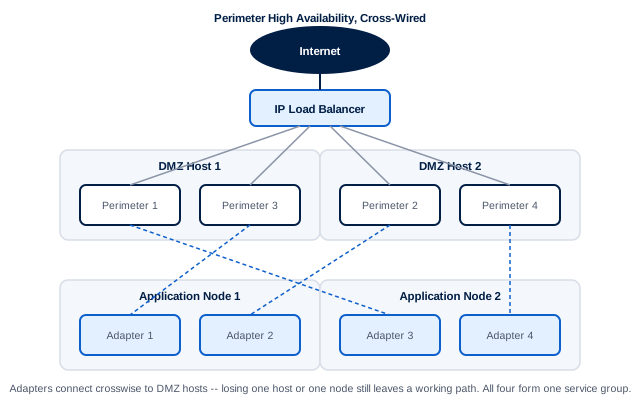
Fig 5.1 – Perimeter high availability. An IP load balancer spreads inbound connections over four perimeter servers on two DMZ hosts. The adapter instances on each application node connect crosswise, so losing a DMZ host or an app node still leaves a working path. All four instances belong to one service group.
The rules for scaling this out:
- All adapter instances need compatible, nearly identical configurations.
- For inbound HA, the DMZ hosts need virtual IPs so each perimeter server has its own listening port, or the load balancer must do Port Address Translation.
- For outbound HA, put all instances in one group and have BPs call the group, never an instance.
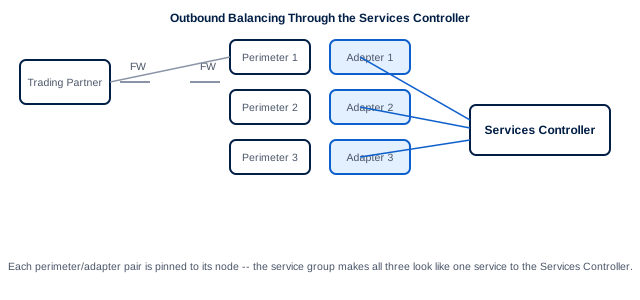
Fig 5.2 – Outbound balancing through the Services Controller. Three perimeter/adapter pairs feed one Services Controller. Each pair is pinned to its node, and the service group makes them look like one service.
Web tier: the HTTP Server adapter needs a load balancer
If you use the HTTP Server adapter (which several other adapters run on top of), you need a software or hardware load balancer in front of the nodes. Without one, all traffic arrives at one IP and one node.
| Method | Layer | Pros | Cons |
|---|---|---|---|
| DNS round robin | Name | Free and simple. Clients can retry by resolving again. | No health awareness, little control |
| Proxy server | HTTP | Can route by request type, keeps sessions on one server, fails over to a secondary | Extra hop, software throughput limits |
| Hardware LB | IP | More algorithms, fewer hops, SSL offload, skips dead servers | Cost. Needs to be session-aware to keep sessions on one node. |
Sticky sessions. Behind a load balancer, turn on stickiness. Client-IP affinity is the recommended choice. Session-ID affinity (JSESSIONID or the SSL session ID) also works but is the weaker option. You configure persistence on the load balancer itself.
Takeaways
- Read
clusteradapter.properties. Every entry is a possible single point of failure. - Service groups are the standard fix: one instance per node, BPs call the group.
- Perimeter servers belong to a node. Cross-wire them to DMZ hosts and use VIPs or PAT for inbound traffic.
- HTTP Server adapter means a load balancer is required. Make it sticky on client IP.
← Part 4: Control & Recovery | Next: Part 6: Capacity planning and failover patterns that hold up →