

Series: Clustering Sterling B2B Integrator – Part 1: Why Cluster · Part 2: Architecture · Part 3: Load Balancing · Part 4: Control & Recovery · Part 5: Adapters & Edge · Part 6: Capacity & Failover
Last part: how big to build the cluster, how to scale it, and how to pick between active/active, active/passive, and OS-level failover. It ends with a tested Windows Failover Cluster runbook.
Work out the real requirement
Business processes fall into two groups:
- No deadline: capacity = arrival rate + margin. If you need two nodes to keep up, you are not resilient, because losing one node means falling behind.
- Deadline-bound: model three scenarios. Normal. Everything running late (how late is acceptable?). Recovery, where you meet today’s deadlines while re-running yesterday’s failed large jobs. Find the largest jobs and plan for them running outside their usual window.
Scheduling work across the day, week, or month usually beats processing every document the moment it arrives. If you run short, you can add a node to a running cluster.
Capacity checklist
| Resource | What to size |
|---|---|
| Local disk | Locally stored documents |
| DB disk | Documents, tracking data, persisted BP state. The archive policy drives this. |
| DB compute | Processing power, connections, memory |
| Nodes | Memory, CPU, node count |
| Network | Adapters ↔ partners, nodes ↔ DB, node ↔ node |
Vertical vs horizontal scaling
| Vertical lever | What it buys |
|---|---|
| More CPUs | More threads running at once, so more concurrent work |
| Faster CPUs | Each BP finishes sooner. Little change in concurrency. |
| More memory | Helps everything, if you also raise the caching and persistence settings |
| More I/O | Large gains when the File System adapter or local document storage is busy |
Horizontal scaling (more nodes) gives very high ceilings when paired with a parallel database, adds nodes with zero downtime, adds redundancy, gives you more ways to split adapter and I/O work, and lets fast performance come from cheap I/O-limited hardware. The costs: a new node is always less efficient than upgrading an existing one, because of cluster overhead, and every extra machine needs managing.
Lifecycle pattern: Buy two half-populated nodes. In year one, fill them up. When you outgrow them, the vendor will have moved to a new generation, so add a new-generation node instead of replacing the old ones. Nodes don’t have to be identical, but they must run the same JVM version. Tune each node’s thread counts separately – faster nodes will take more of the load on their own.
Single points of failure, layer by layer
Failover and clustering are different things. Clustering is one way to get failover. For each component, list how it can fail, estimate how likely each failure is and how long recovery takes, then weigh that against what it costs to remove the risk. Example: restoring an 8-hour-old database backup and replaying updates may be acceptable compared with paying for 2-hourly backups or a mirrored database. Walk every layer, because one unprotected layer leaves the whole system unprotected:
- System hardware
- Database server
- External applications you integrate with
- B2B Integrator
- Application server
- Web server
Make the file systems redundant. Cluster or mirror the database. Cluster the web tier, or run several web servers, depending on how many users it serves.
Supported topologies
| Pattern | How it works | Verdict |
|---|---|---|
| Active/active | All nodes work all the time. Failover is instant. | Preferred. The hardware that gives you failover also gives you capacity. |
| Active/passive | An identical standby is started manually or automatically when the primary fails | Supported. The switch always takes some time. |
| Hybrid | An active/active cluster plus a passive node that can replace any failed member | Highest availability. Pairs well with test, dev, or DR hardware. |
In active/active, the nodes share only the database, plus the file system if you use file storage. A shared install disk and shared adapter directories make administration and performance easier. Options: CFS, GPFS, Sistina/Lustre-class cluster file systems, HA-NFS, or NAS with failover.
Hardware / OS-level failover (active/passive)
Cluster software from the OS vendor or a third party lets one server take over another’s identity: its network address, its disks, and its workload. The spare can be cold (powered off) or warm (running as much of the stack as possible to cut takeover time). If you must keep full capacity during a failure, the spare sits idle or runs only work you can interrupt, such as test.
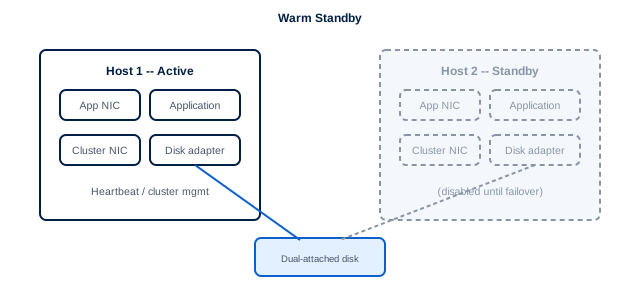
Fig 6.1 – Warm standby. The shaded parts on the standby host stay disabled until the cluster manager declares a failure. Then it connects the dual-attached disk, brings up the application NIC on the same IP, and starts the app with identical config. A real build adds redundant disk and network paths and an out-of-band heartbeat over serial or parallel ports.
Reality check: Building and testing this is hard unless you have done it before. There are many partial-failure cases to cover: a single adapter failing, network partitions, software hangs.
OS-level failover without an application cluster
This is a reasonable choice when the backup hardware is sometimes busy with other work, your site already knows a particular HA product well, you have no front-end traffic redirection, or the main goal is remote DR. The downsides: it ties you to a platform, adds no performance, fails over more slowly (it has to boot the integrator), the two hosts can drift out of sync, and you need an outage to change configuration.
Every OS-level setup has four parts, all run by the cluster manager:
- IP takeover: on the host itself, or with NAT.
- Disk takeover: the primary must lose access first. A shared or cluster file system is the alternative.
- Restart logic: start things in dependency order (scripts on UNIX, scripts plus cluster resources on Windows).
- Failure detection: often helped by serial links, isolated networks, or quorum disks to prevent split-brain.
Option 1 – separate local disks
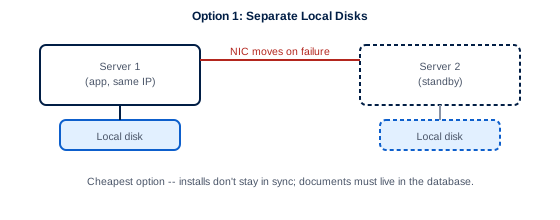
Fig 6.2 – Two independent installs. Cheapest and simplest. The installs do not stay in sync on their own, and because licenses are tied to IP addresses the second cannot run while the first is up. Documents must be stored in the database.
Option 2 – dual-attached disk
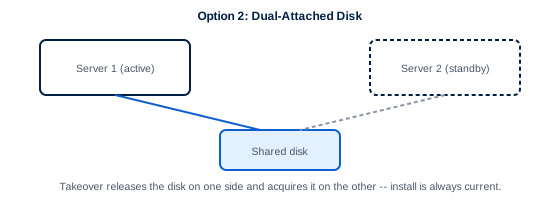
Fig 6.3 – Disk moves with the role. Same speed as local disk, and the installation is always current. Takeover adds a release-and-acquire step for the disk, which the HA software normally handles.
Option 3 – shared network storage
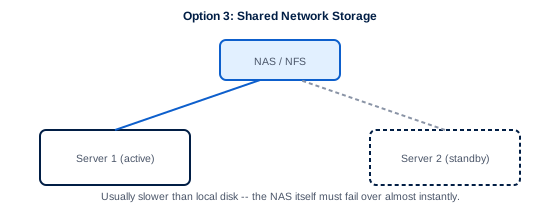
Fig 6.4 – NAS / NFS / Windows shares. Usually slower than local disk, unless temp files stay local and the File System adapter is used lightly. The NAS itself must fail over almost instantly. Suits low-volume sites or sites that already own suitable NAS.
Cluster managers by platform
| Platform | Options |
|---|---|
| Windows | Windows Failover Clustering, LifeKeeper, Veritas Cluster Server |
| AIX | HACMP |
| Solaris | Sun Cluster, Veritas Cluster Server |
| HP-UX | Serviceguard, Veritas Cluster Server |
| IBM i (OS/400) | OS/400 Cluster Manager |
| RHEL / SUSE | Red Hat Cluster Suite, Serviceguard, open-source stacks |
Before you sign off on OS-level HA
- Configuration drift: keep both hosts in sync, including the differences they are meant to have. This matters most after repairs.
- Split-brain: the cluster manager declares a node dead while it is still running and still writing to the database.
- A corrupted file system on takeover: journaling helps, but heavy load still causes it.
- Untested failover doesn’t work. You can trust it much less than an active/active cluster where both nodes run all the time, and testing it carries risk of its own.
Common places to send the failover: a test or dev box (good hardware use, but drift risk), a dedicated spare covering several production systems (shared risk), or the database host, with the two failing over to each other (cheap, but often too slow).
Runbook: Windows Failover Cluster (local drive)
1. Install on each node
- Install on machine 1’s local drive at base port
xxxxx. Keep the default IP during install, and apply your fix packs. - Start it and confirm it comes up cleanly.
- Note the Windows cluster name and IP.
- Back up
install_dir/install/properties/sandbox.cfg, then edit it:
EXT_HOST_ADDR=<cluster IP address>
HOST_NAME=<cluster IP address>
LOCALHOST=<cluster IP address>- Repeat the whole install and test on machine 2, using the same base port.
2. Register the cluster resource
- In Cluster Administrator, open a connection to your cluster, go to Resources, then Add New Resource.
- Name:
application at port xxxx· Type: Generic Service · Group: your cluster group. - Possible owners: both nodes.
- Dependencies: Cluster IP address only. This is what moves the IP on failover.
- Service name:
application at port xxxx, with no parameters. Then Finish.
3. Bring it online
- Right-click the resource and choose Bring Online.
- Watch
install_dir\install\logson machine 1. - Browse to
http://<cluster-name>:xxxxx/wsand run a smoke test.
4. Prove the failover
- Wait at least 3 minutes after it comes online. Check the UI and the Windows Event Viewer (Application and System logs).
- On machine 1, run hardstop from
install_dir\install\bin. - Cluster Administrator should go Online Pending, then Online.
- Confirm machine 1’s services stopped and machine 2’s started, with clean logs.
- Log in at
http://<cluster IP>:<port>/wsand run operations. You are now on node 2. - Run hardstop on machine 2 and confirm it fails back to machine 1.
Series wrap-up
- Size for the recovery scenario, not the normal day. Needing N nodes to keep up means you aren’t resilient.
- Active/active is the default choice. Add a passive node or OS-level HA only for DR or when policy requires it.
- Every layer, from power to web server, is either protected or a single point of failure.
- If you haven’t tested failover, assume it doesn’t work. Run the hardstop drill on a schedule.
That’s the series. If you’re sizing, designing, or troubleshooting a Sterling B2B Integrator cluster and want a second set of eyes on the plan before you commit hardware, talk to an EDI expert or request an assessment – this is exactly the kind of design review we do as part of EDI Managed Services.